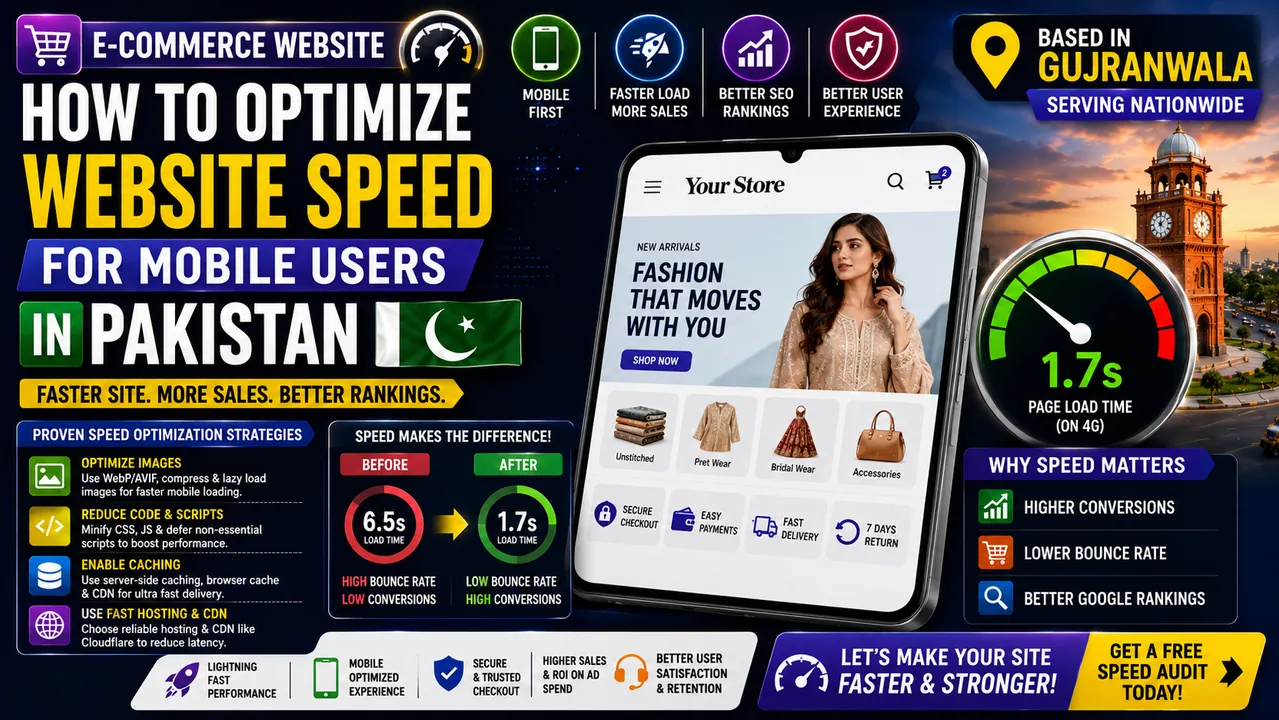

E-commerce is booming in Pakistan, but many business owners ignore a critical factor that determines their online sales success: loading speed. Over 70% of online shoppers in Pakistan browse and purchase using mobile devices. However, mobile internet infrastructure across the country, especially in smaller cities and rural areas, relies on unstable 3G and 4G networks with high latency. If your online store takes longer than 3.0 seconds to load, mobile visitors will immediately bounce back to Google. To retain these potential buyers, build brand trust, and secure high rankings on search results, you must aggressively optimize ecommerce website speed. Slow loading times directly translate to lost revenue, wasted marketing budgets, and poor customer satisfaction.
Why You Must Optimize Ecommerce Website Speed in the Pakistani Market
Pakistani online shoppers are highly impatient, and their behavior is heavily influenced by mobile network quality. Unlike desktop users on high-speed broadband connections, mobile users frequently experience bandwidth fluctuations. When a website is bloated with heavy images, uncompressed scripts, and unnecessary plugins, it fails to load on mobile connections, causing users to abandon their shopping carts. When you optimize ecommerce website speed, you ensure that your catalog pages, product descriptions, and checkout screens load instantly, even on weak connections. This speed optimization directly increases conversion rates and maximizes the return on your digital marketing spend.
Furthermore, Google uses page speed as a primary ranking signal in its mobile-first indexing algorithm. If your mobile website loads slowly, search engines will demote your pages in favor of faster competitors. A fast-loading store ranks higher, attracts more organic search traffic, and establishes your brand as a modern, reliable leader. Speed is not just a technical metric; it is a critical business asset that directly influences your bottom-line profitability in the highly competitive e-commerce sector. Slow speeds also negatively affect paid advertising campaigns on platforms like Facebook and Instagram by inflating cost-per-click rates.
Technical Strategies to Optimize Ecommerce Website Speed
Improving e-commerce performance requires a multi-layered technical approach. The first priority is aggressive image optimization. Products listings require high-quality visuals, but uncompressed JPGs or PNGs can easily exceed several megabytes. Developers solve this by converting all images to modern formats like WebP or AVIF, which reduce file sizes by up to 80% without losing visual clarity. Implementing dynamic lazy loading ensures that product images only load as the user scrolls down the page, saving valuable mobile data and reducing initial page render times.
Another critical strategy is reducing code bloat. E-commerce sites built on generic templates often load hundreds of lines of unused CSS and JavaScript files. Web developers minify these files, combine style sheets, and defer non-essential scripts (such as analytics or chat widgets) so they do not block the main page rendering. Setting up server-side caching and utilizing a content delivery network (CDN) like Cloudflare also ensures that your static assets are cached on edge servers close to the user's location, reducing server response times and database load. The combination of local caching and global CDNs keeps latency low.
Understanding Core Web Vitals for E-commerce
To measure speed accurately, Google introduced Core Web Vitals. These are three specific user experience metrics: Largest Contentful Paint (LCP), Interaction to Next Paint (INP), and Cumulative Layout Shift (CLS). LCP measures how fast the main content of a page loads. For an optimal experience, it should occur within 2.5 seconds. INP measures visual feedback responsiveness when a user taps a button or interacts with a menu, which is critical for mobile checkouts. Finally, CLS measures visual stability—ensuring elements do not shift unexpectedly as the page loads, which can cause accidental clicks and frustrate buyers.
A professional developer optimizes these metrics by prioritizing critical assets, establishing explicit width and height dimensions for all images and block containers, and optimizing Javascript execution paths. Resolving Core Web Vitals issues directly improves your website's performance score on PageSpeed Insights, ensuring that search engines recognize your site as healthy, lightweight, and highly optimized for mobile devices.
The Direct Connection Between Responsive Web Design Gujranwala and Performance
Visual layout and performance are deeply interconnected. Utilizing modern responsive web design gujranwala practices ensures that your website's layout dynamically adapts to fit any screen size, from small smartphones to large desktop monitors, without loading separate stylesheets or duplicate media assets. Clean CSS layouts built with Flexbox or CSS Grid are highly lightweight, requiring minimal code to render complex grid alignments. This lightweight structure allows mobile browsers to parse and render pages much faster than traditional, template-heavy structures.
A responsive layout also reduces redirect latency. In the past, companies used separate mobile subdomains (like m.website.com), which required slow redirects. Modern responsive web design eliminates redirects completely, providing a single, fast-loading URL structure. By prioritizing clean styling and responsive design principles, local businesses can provide a premium, modern user experience that keeps customers engaged and encourages them to explore more products. Keeping your design lightweight ensures that visual appeal does not compromise load speed.
Why Hiring a Professional Frontend Developer is Essential for Site Optimization
Achieving sub-second loading speeds requires deep technical knowledge that automated plugins cannot provide. A skilled frontend developer plays a vital role in optimizing code structures, managing asset loading priorities, and choosing efficient rendering frameworks. For example, a developer can set up critical CSS inline to render the above-the-fold content instantly while the rest of the style sheets load in the background. They also configure resource hints like DNS prefetch and preconnect, allowing the browser to establish early connections to third-party domains (like payment gateways or font libraries).
Furthermore, frontend developers can build your store using modern headless frameworks like Next.js or React. These frameworks utilize static site generation (SSG) to pre-render pages into static HTML during the build phase. This means that when a mobile user clicks a link, the page loads instantly without waiting for a database query, providing a native app-like experience. Investing in expert frontend coding ensures that your store is fast, secure, and ready to scale. Modern frameworks also integrate automatic script optimization pipelines, simplifying long-term site updates.
Database and Cache Optimization for Wholesale and Retail Stores
Performance optimization also extends to the backend server and database. E-commerce platforms like WooCommerce execute multiple database queries to load product prices, check inventory levels, and process checkout details. If your database is cluttered with expired transient records, old order logs, and unindexed tables, your server response times will slow down dramatically. Developers resolve this by cleaning database tables, setting up transient caching, and using database optimization tools. Implementing object caching solutions like Redis ensures that frequently accessed database queries are cached in the server's memory, bypassing slow disk-read operations and loading catalog pages instantly.
Case Study: Speed Optimization for a Pakistani Fashion Portal
Consider the case of a local clothing brand in Gujranwala. Their mobile website took 6.5 seconds to load, resulting in a high bounce rate of 62% and a conversion rate of just 1.2%. They hired a web developer to optimize their e-commerce speed. The developer compressed product media, removed unused plugins, and migrated the site to a clean Next.js frontend. The page load speed dropped to 1.7 seconds on 4G connections. Within two months, the bounce rate decreased to 28%, and their conversion rate doubled to 2.4%, resulting in a 100% increase in monthly online revenue without spending more on ads.
Frequently Asked Questions
❓ Why is mobile page speed more critical in Pakistan than in Western markets?
In Pakistan, the majority of e-commerce traffic relies on mobile 3G/4G connections, which are often unstable and have high latency compared to high-speed broadband. A heavy website that loads reasonably fast on high-speed Western broadband will fail to load or load extremely slowly on local mobile networks, making speed optimization a survival requirement for local businesses.
❓ How do heavy image files impact mobile loading speeds?
Images represent the largest file weight on most e-commerce pages. Uncompressed images require mobile browsers to download megabytes of data over slow connections, causing long delays before the page becomes interactive. Using modern compressed WebP/AVIF formats and lazy loading drastically reduces this payload, enabling fast loading on mobile devices.
❓ Does web hosting location affect my site speed for local users?
Yes. If your target audience is in Pakistan but your web server is located in the US or Europe, data must travel long distances, increasing latency and page load times. Using local servers, hosting close to the region (e.g., Singapore or Middle East datacenters), and setting up CDNs like Cloudflare drastically reduces this latency for local Pakistani visitors.
❓ What tools can I use to measure my e-commerce store's loading speed?
The best free tools to measure loading speed include Google PageSpeed Insights, WebDev (Lighthouse), and GTmetrix. These tools analyze your site's mobile performance, measure Core Web Vitals (like Largest Contentful Paint and Cumulative Layout Shift), and provide detailed developer recommendations to resolve specific performance bottlenecks.
Conclusion and Next Steps
Optimizing your e-commerce speed is the most effective way to improve user experience, reduce bounce rates, and increase sales. By prioritizing mobile-first optimization, you build a sustainable digital store that thrives under local Pakistani network conditions. To learn how a high-performance web structure can scale your online sales, visit the About Mian Adil page to explore my technical skills and work, or head to the Contact Page to schedule a speed audit and request a custom performance quote. Let's make your website load instantly.
Turn These Insights Into Results
Choose the most relevant next step for your website or online business.
- E-Commerce Website Development Launch a fast, secure online store designed for sales and growth.
- Get a Free E-Commerce SEO Audit Check search visibility, speed, and conversion-critical website issues.
- Explore Mian Adil’s Portfolio See web development, SEO, e-commerce, and SaaS work in one place.